About TREX IPTV — Movies, Live TV & Series

TREX IPTV (also known as IPTV TREX) is built for smooth streaming, clean organization, and fast support. We help you get set up quickly on popular apps and devices — start watching in minutes.

TREX IPTV content at a glance

A large library, updated regularly—made to keep your entertainment nonstop.

Movies

0+

Blockbusters, classics, and trending titles.

Series

0+

New seasons, popular shows, and binge-ready picks.

Live TV Channels

0+

Sports, news, entertainment, kids, and worldwide channels.

Numbers are based on your current catalog: 50,500+ Movies, 36,980+ Series, 53,000 Live Channels.

The TREX IPTV story

TREX IPTV started with one simple goal: make IPTV easy and enjoyable. We focus on what matters most—stable playback, a clean browsing experience, and quick help when you need it.

Built for real users

Simple steps: choose a plan, get your details, log in, and watch.

Organized catalog

Clear content grouping for Movies, Series, and Live TV.

Always improving

We update content and optimize performance to keep things smooth.

Mission & values of TREX IPTV

Our mission is to deliver a smooth, reliable TREX IPTV subscription experience with fast setup and support.

Speed

Fast onboarding and quick solutions, so you spend more time watching.

Reliability

Optimized delivery and quality options (HD/4K where available).

Support

Friendly help for setup, troubleshooting, and best practices.

What makes TREX IPTV different

We focus on the experience—not just a long list. Clean organization, guidance, and responsive support.

Easy setup guidance

We help you install and configure on popular apps/devices quickly.

EPG support

Better navigation on Live TV with guide support (where available).

Anti-freezing focus

Optimizations to reduce buffering (network quality still matters).

Team & skills

We're a small team focused on streaming delivery, catalog organization, and customer success.

Setup Support

Installation help, playlists/logins, and player configuration across devices.

Streaming Delivery

Performance tuning and stability checks to keep playback smooth.

TREX Reseller Program

Reseller plans for partners who want to offer TREX IPTV subscriptions using the TREX Panel.

Compatible with your gear

TREX IPTV plays nicely with the devices already in your home — Smart TVs, streaming sticks, consoles, mobile, and IPTV boxes. Whatever you watch on, we likely already work on it.

Where TREX reaches

Trex IPTV built in Europe, tuned for the Netherlands, and streaming smoothly across the world. Hover any country to see the signal strength on the TREX network.

Country
Strength
TREX IPTV logo

Ready to start?

Join TREX IPTV today and get your subscription details fast. If you need help, message us anytime.

WhatsApp Support "¢ Fast response
Get Subscription Download App

FAQ — TREX IPTV Subscription

Tap a question to see the answer (subscription, prices, app, setup).

How do I activate my TREX IPTV subscription?
Choose a plan, contact us on WhatsApp, receive your TREX IPTV subscription details (login/playlist), then sign in on the app (APK) or your IPTV player.
Do TREX plans include Movies, Series, and Live TV bundles?
Yes. A TREX IPTV subscription is made for Live TV plus VOD (Movies & Series). The exact catalog may vary depending on your setup.
Where is the TREX app link?
Scroll to the "Download App" section and tap "Download App" to get the APK.
What should I message to get my subscription fast?
Message: "Hello, I need a TREX IPTV subscription. Send me plans + prices and the app link." We'll guide you step-by-step.
Buffering or freezing — what can I do?
Use stable internet (Wi-Fi or strong 4G/5G), restart the app/router, and try again. If it continues, contact support with your device and app name.
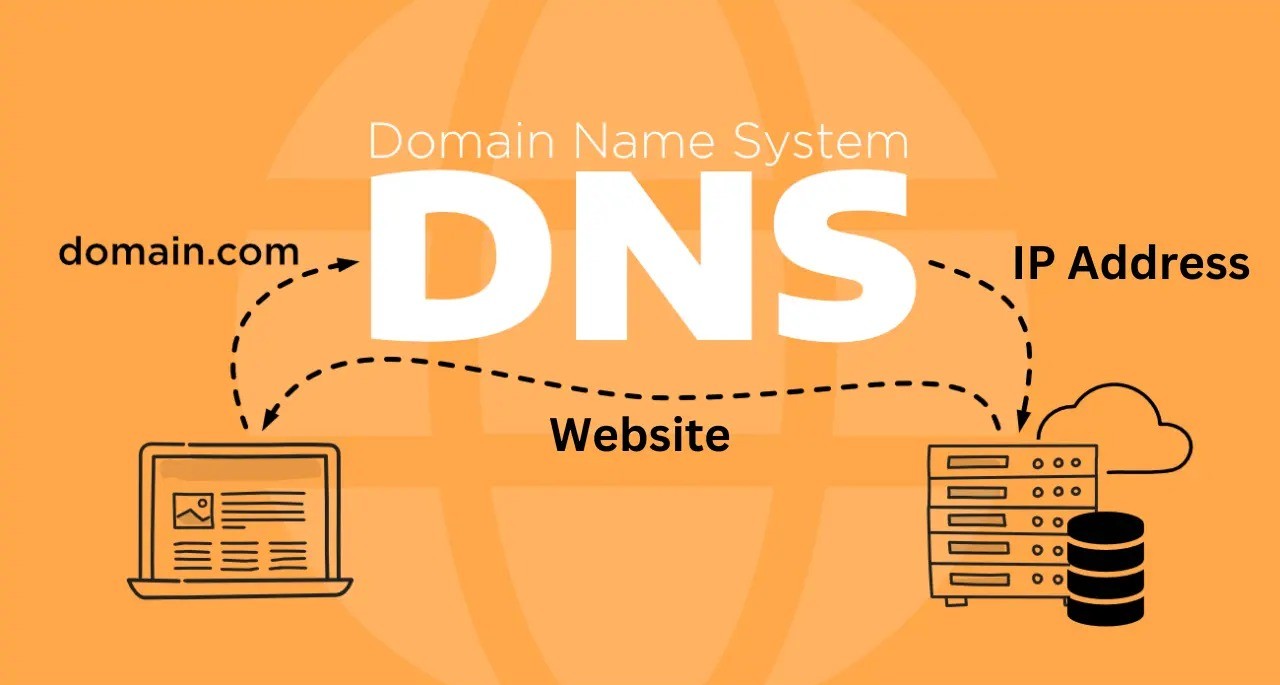
TREX IPTV DNS setup

Setup your domain with TREX IPTV

Using your own domain is the safest way to run your TREX IPTV panel — it avoids ISP-level blocks and gives your customers a stable URL that never changes. The setup is fully self-service from your panel; no Telegram message needed.

Steps

  • Step 1 — Buy a domain. Get a domain name from Namecheap, Hostinger, GoDaddy, or any registrar you trust.
  • Step 2 — Add it to your panel. Open your TREX panel → My Services > My Host → click Add host. Type the bare domain only: name.com (no http://, no www, just the name).
  • Step 3 — Copy the nameservers. The panel will display two nameservers for your new host. Copy them.
  • Step 4 — Paste them at your registrar. Log in to the registrar where you bought the domain, open the domain manager, and replace the default nameservers with the ones from your TREX panel.
  • Step 5 — Wait up to 48 hours. DNS propagation takes time. Once it's live, your panel will route through your own domain automatically.

That's it — no waiting on support, no manual linking. If anything looks off after 48 hours, message the TREX team and we'll check it.

Team TREX.

Join TREX IPTV on Telegram

Join TREX IPTV on Telegram

Stay updated with the latest announcements of TREX , server updates, new content releases, and exclusive offers. Our Telegram channel is the fastest way to get news and support.

Get instant notifications about maintenance, improvements, and special reseller opportunities.

Join TREX on WhatsApp